
Download the John L. Scott Home Search App
Search homes from your phone, explore neighborhoods on the map, save the properties that stand out and share listings while you narrow your options. Use Jason Fox’s personalized download page to get started with The Madrona Group.


The personalized link detects your device and routes you toward the applicable app-download option. App availability, features and store requirements may change.

Why use the personalized John L. Scott app link?
The personalized page gives you one clean starting point for downloading the app and connecting your search with Jason Fox and The Madrona Group. Instead of trying to remember which app to choose or searching through several similarly named products, open the link on the phone where you want to install it.
The app is best used as a fast, everyday search tool. Check new options while you are away from a computer, revisit saved homes, share a listing with another decision-maker and contact your agent when something deserves a closer look. For deeper neighborhood research, market context or a broad desktop search, use The Madrona Group website alongside the app.
What the home search app helps you do
The strongest app experience is not about staring at more listings. It is about organizing the right listings and making it easier to act when a home fits.
Search from anywhere
Explore homes while commuting, traveling or visiting a neighborhood. Mobile access makes it easier to check options when a desktop search is not convenient.
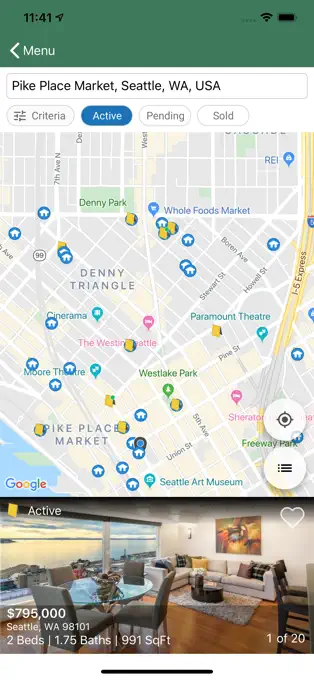
Use a map-first view
Search by the part of town you actually care about, then zoom in to compare location, nearby streets and the relationship between listings.
Save promising homes
Keep a shorter list of serious possibilities instead of repeatedly finding the same properties. Favorites are most useful when you also note what you like and what concerns you.
Share listings quickly
Send properties to a spouse, partner, family member or your agent so everyone can discuss the same home rather than relying on screenshots and partial addresses.
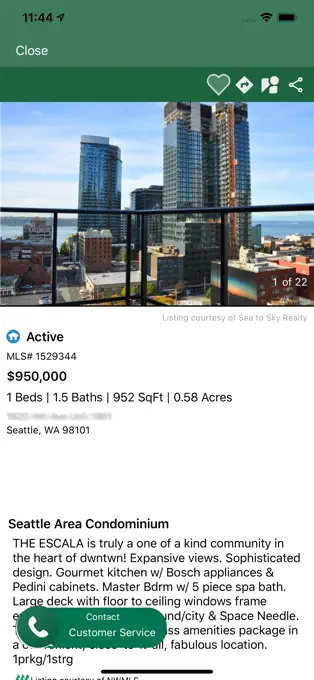
Review listing details
Use the app to scan photos, property information and listing updates, then ask your agent to investigate disclosures, offer timing and issues that do not fit neatly on a screen.
Move from browsing to strategy
When a home looks serious, contact The Madrona Group for a property review, showing plan and offer strategy instead of waiting until the last minute.
How to download and start using the app
Complete these steps on the phone or tablet where you plan to use the app.
Open Jason’s link
Visit jlsapp.com/jasonfox from your mobile browser or tap one of the download buttons on this page.
Choose your device
Follow the personalized page to the appropriate App Store or Google Play option for your phone.
Install and open
Complete the normal store installation, open the app and follow the on-screen setup prompts.
Build your search
Start broad enough to learn the market, save the homes that fit and contact Jason when you are ready to compare or tour them.
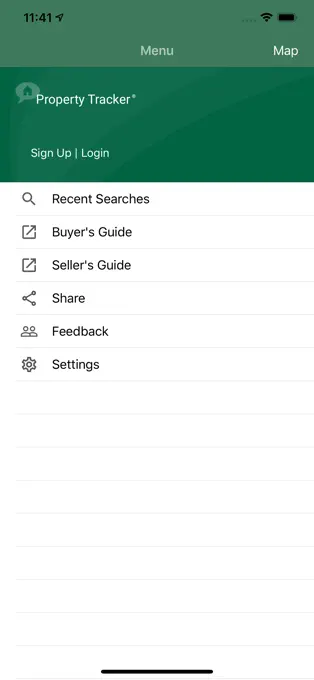
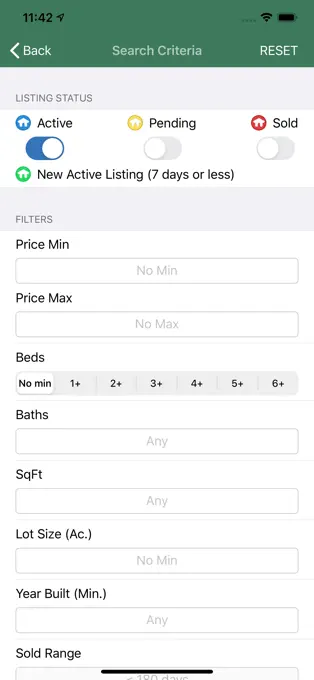
John L. Scott app screen previews
The six supplied app images are displayed at their natural proportions. Nothing is stretched into a banner or cropped to fill a box.

Use the app to learn the market—not just collect favorites
Start broad, then tighten the search
- Begin with the locations, price range and property types that are genuinely possible.
- Avoid adding so many filters that you eliminate homes you would have considered in person.
- Compare new listings with recent favorites to see what your budget consistently buys.
- Tell your agent why you rejected a property. That information improves the next search.
Know when to stop scrolling and call
- The home matches the needs that matter most—not merely the cosmetic wishlist.
- The location, condition or pricing creates questions the listing cannot answer.
- You would be disappointed to learn the property sold before you toured it.
- You need a comparison with recent sales before deciding whether the asking price makes sense.
Open the personalized app page on your phone
Use Jason Fox’s download link, install the app for your device and start building a search. Need help with criteria or neighborhoods? Call or email The Madrona Group.
Frequently asked questions
Where do I download the John L. Scott home search app?
Open https://www.jlsapp.com/jasonfox on the phone where you want to install the app. The personalized page provides the available download path for your device.
Can I use the app on an iPhone or Android phone?
The page provides App Store and Google Play download options. Device compatibility and operating-system requirements are controlled by the applicable app store and may change over time.
Why should I use Jason Fox’s personalized app link?
It gives you a simple, branded starting point for downloading the app and connecting your home search with Jason Fox and The Madrona Group.
Can I save and share homes in the app?
The app is designed to make mobile home searching and organizing properties easier. Available saving, sharing and account features may depend on the current app version and your setup.
Should I use the app or the full website search?
Use the app for convenient searching on your phone. Use the full website search when you want more screen space, and use The Madrona Group’s neighborhood pages for local context beyond the listing itself.
Are listing prices and statuses guaranteed to be current?
No search tool should replace direct confirmation. A property can receive an offer, change status or establish an offer deadline quickly. Ask your agent to confirm the latest information before making plans or decisions.
Does downloading the app obligate me to work with an agent?
Downloading a search app is not the same as signing a buyer brokerage services agreement. Representation terms are addressed separately in writing before an agent provides brokerage services.
Who can help me build a better home search?
Contact Jason Fox and The Madrona Group at 206-899-5155 or [email protected]. We can help refine the location, budget, property type and tradeoffs behind your search.
Download the John L. Scott app with Jason Fox
Search from your phone, save the homes worth discussing and contact The Madrona Group when you are ready to turn a listing into an informed decision.